Schoology in EPISD stands as the main online tool for learning and teaching in the El Paso Independent School District. This platform connects students, teachers, and parents in one spot for school activities. Many people search for details on Schoology in EPISD to understand its setup and daily use. In this post, readers find clear info on access, features, and tips based on official district sources. The goal is to help families and staff make the most of it for better education outcomes.
What Is Schoology in EPISD?
Overview of the Platform
Schoology in EPISD acts as a learning management system that schools across the country rely on for online education needs. In EPISD, it serves as the central hub where classes happen digitally. Users post assignments, share files, and track progress all in one place. The system includes tools for quizzes, discussions, and calendars to keep things organized. EPISD chose this platform because it fits well with modern teaching methods and supports remote or in-person setups. People appreciate its user-friendly design that works on computers, tablets, or phones.
Role in the District
EPISD uses Schoology in EPISD to support daily school operations for over 50,000 students in more than 80 campuses. It plays a key part in blending technology with classroom lessons. Teachers create courses, while students submit work and check feedback. Parents monitor progress without needing to visit schools often. The district integrates it with other tools like Google Drive for smoother workflows. This setup promotes personalized learning where each student gets content suited to their needs. Overall, it strengthens connections between home and school for improved results.
How to Access Schoology in EPISD
Student Login Steps
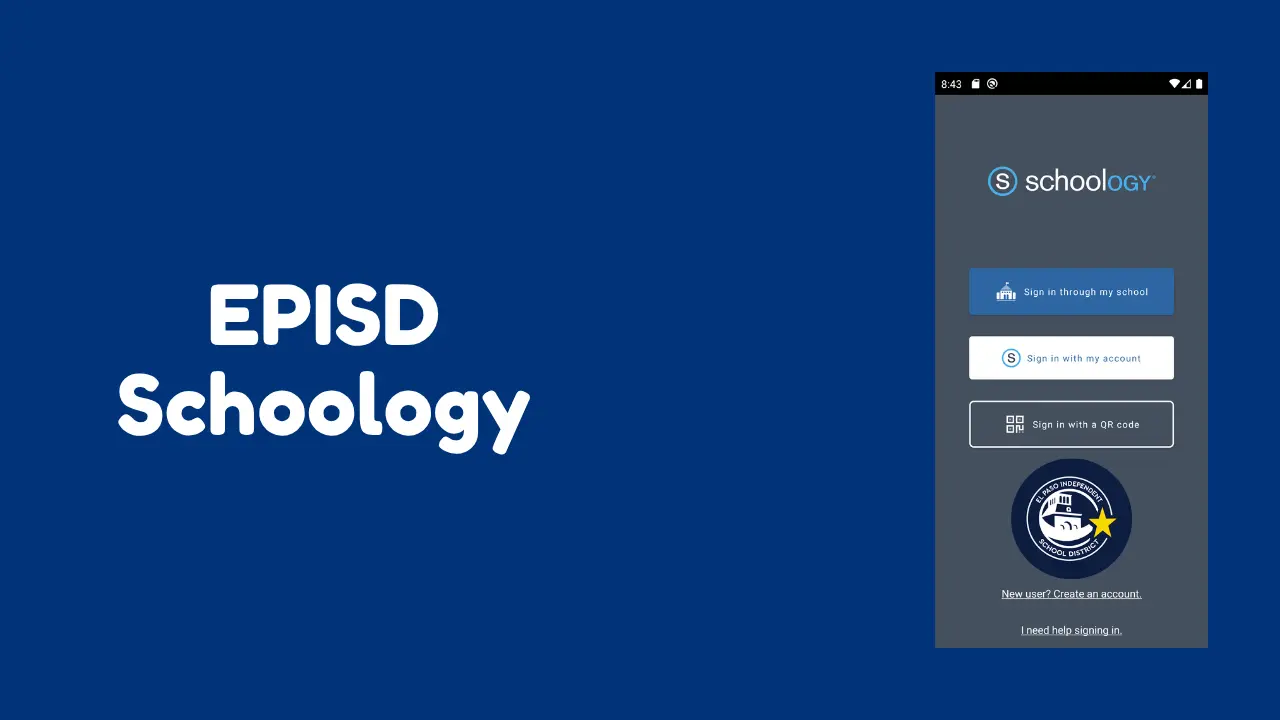
Students in EPISD start by going to the official login page at episd.schoology.com. They enter their school email and password provided by the district. If it’s the first time, they might need to reset credentials through the student portal. ClassLink offers another way to sign in, which links to multiple apps. Once inside, the dashboard shows courses and updates. Issues with login often stem from forgotten passwords, so contacting the school IT help fixes that quickly. This process ensures secure entry to all class materials.
Parent Account Setup
Parents set up accounts using codes from their child’s school. They visit the Schoology in EPISD site and click on the parent signup option. Input the code ties the account to the student’s profile. After that, they create a username and password. The dashboard then displays grades, assignments, and messages from teachers. EPISD provides guides in English and Spanish for this step. Regular checks help parents stay informed about academic performance. This feature builds stronger family involvement in education.
Teacher Access Methods
Teachers log in through the same main portal but with staff credentials. They use district emails for entry. The system allows them to manage multiple classes at once. EPISD offers training sessions on setup and best practices. Teachers find resources in a dedicated help group within the platform. Quick access to student data aids in planning lessons. This streamlined method saves time and focuses efforts on teaching.
Key Features of Schoology in EPISD
Assignments and Grades
One main feature involves handling assignments where teachers upload tasks and due dates. Students submit work directly online, and grades appear instantly. The gradebook tracks scores across subjects. Notifications alert users to new items or changes. EPISD customizes this to align with district standards. Reports show trends in performance over time. This transparency helps everyone stay on top of academic responsibilities.
Communication Tools
Schoology in EPISD includes messaging for direct talks between users. Teachers send announcements to whole classes or individuals. Discussion boards encourage group interactions on topics. Parents message educators about concerns. The calendar syncs events and reminders. EPISD promotes these for better collaboration. Video calls integrate for virtual meetings. Such options keep lines open even outside school hours.
Resources and Materials
The platform stores files like videos, documents, and links in course folders. Teachers share lesson plans and study guides. Students access them anytime for review. EPISD adds district-wide resources for extra support. Integration with apps like OneDrive expands storage. Search functions make finding items easy. This collection aids in self-paced learning and reinforces class content.
Benefits for Students in EPISD
Students gain from anytime access to class materials, which fits busy schedules. They review lessons at their own pace, helping with tough subjects. Real-time feedback on work improves understanding quickly. The system organizes everything in one spot, reducing lost papers. EPISD students build digital skills useful for future jobs. Group projects become simpler with shared tools. Overall, it makes learning more engaging and efficient. Personalization stands out as a big plus. Teachers tailor content to individual needs through the platform. Students track their own progress and set goals. Notifications keep them aware of deadlines. EPISD reports higher engagement rates with this setup. It prepares them for college or careers where online tools are common. Such benefits lead to better academic outcomes district-wide.
How Teachers Use Schoology in EPISD
Course Creation and Management
Teachers begin by building courses with folders for units and materials. They add assignments, quizzes, and rubrics for grading. The platform allows copying content from past years to save time. EPISD provides templates for consistency across schools. Updates happen in real time, so changes show immediately. This structure helps maintain organized classrooms online.
Engaging with Students
Interactions occur through comments on submissions and discussion posts. Teachers post polls or questions to spark interest. Video lessons upload easily for flipped classrooms. EPISD encourages using these for active participation. Analytics show who engages most, guiding support efforts. Such methods foster a positive learning environment.Quizzes and tests create with various question types. Automatic grading speeds up the process for multiple choice. Teachers add detailed notes on open-ended work. Reports generate to analyze class performance. EPISD uses this data for curriculum adjustments. Timely feedback motivates students to improve.
Parent Involvement Through Schoology in EPISD
Parents view real-time grades and assignment status to guide their children. They receive alerts for upcoming due dates or low scores. Messaging teachers directly resolves issues fast. EPISD offers workshops on using the platform effectively. This involvement boosts student success rates. Families feel more connected to school life.The parent dashboard simplifies monitoring multiple kids. Reports detail attendance and behavior notes. Resources like guides and videos help new users. EPISD stresses privacy in all features. Active parents often see improved attitudes toward school in their children. It bridges gaps between home and education.
History of Schoology Implementation in EPISD
EPISD started using Schoology in EPISD around 2017 as part of a push for modern education. It replaced older systems to better support digital learning. The district trained staff through sessions and online modules. By 2018, parents gained access for grade checks. This timing aligned with growing needs for online tools.During 2020 remote learning periods, usage spiked district-wide. Tutorials and support ramped up to help everyone adjust. EPISD integrated it with 1:1 device programs for students. Over years, features expanded to include more apps. The platform now forms a core part of daily operations. Continuous updates keep it current with education trends.Feedback from users shaped improvements. EPISD surveyed families on what worked best. Adjustments focused on ease of use and reliability. Today, it supports hybrid models blending in-person and online elements. This evolution shows commitment to quality education in El Paso.
Support and Resources for Schoology in EPISD
Official District Help
EPISD maintains a dedicated page with guides and FAQs. Users find videos on common tasks like login or grade views. The instructional technology team offers webinars. Schools assign tech specialists for on-site aid. Contact info appears on the main website for quick questions. These options ensure smooth experiences for all.
Community and Tutorials
YouTube channels from EPISD feature step-by-step clips. Parents and teachers join groups within Schoology in EPISD for tips. District newsletters highlight updates. External sites share user stories from similar districts. EPISD encourages sharing best practices among staff. Such networks build confidence in using the tool.
Troubleshooting Common Issues
Password resets go through the student or parent portal. Slow loading often ties to internet speed; try different devices. Missing courses mean checking enrollment with schools. EPISD advises clearing browser cache for glitches. Security settings protect data, so avoid public networks. Quick fixes like these keep access reliable.
Conclusion
Schoology in EPISD brings together tools that make education more accessible and connected. From login basics to advanced features, it supports students, teachers, and parents in daily tasks. The platform’s benefits include better organization, communication, and personalized approaches. Users gain value through easier tracking of progress and stronger school-home ties. For anyone in the district, mastering this system leads to smoother school years and higher achievement. It equips the community for success in a digital world.
What is the main login page for Schoology in EPISD?
The primary access point is episd.schoology.com. Students and staff use district emails there. Parents link accounts with provided codes. ClassLink serves as an alternative entry for linked apps.
How do parents check grades on Schoology in EPISD?
After setup, the dashboard shows grades and assignments. Click on courses for details. Alerts notify of changes. Regular logins keep families updated.
Can students use Schoology on mobile devices in EPISD?
Yes, the app works on phones and tablets. Download from app stores. It mirrors the web version for assignments and messages. EPISD recommends it for on-the-go access.
What if a user forgets their password for Schoology in EPISD?
Reset options appear on the login page. Use school email for recovery. Contact campus IT for further help. EPISD portals assist in credential changes.
Does EPISD offer training for Schoology?
Sessions occur for teachers and parents. Online videos cover basics. The district’s tech team provides ongoing support. Check the website for schedules.